
Phantom browser wallet: what it does and how it works
Phantom began as a Solana wallet and now also handles Ethereum, Bitcoin, Base, Sui and more. A plain guide to its features, fees, networks and risks.
Product details
| Made by | Phantom Technologies, Inc. |
|---|---|
| Launched | 2021 |
| Networks | Solana, Ethereum, Base, Polygon, Bitcoin, Sui, HyperEVM, Monad |
| Browsers | Chrome, Brave, Edge, Firefox |
| Mobile app | iOS and Android |
| Hardware wallets | Ledger only |
| Built-in swaps | Yes. 0.85% on selected swaps; bridges about 0.1–0.5% |
| Open source | Not stated. Audit reports are public |
| Custody | Self-custody. You hold the seed phrase |
What you can do with it
| Feature | Available | Notes |
|---|---|---|
| Send and receive | Yes | Eight networks from one seed phrase |
| Transaction preview | Yes | Shows balance changes before you approve |
| Swaps and bridging | Yes | 0.85% on selected swaps |
| SOL staking | Yes | Native staking and a liquid staking token |
| NFTs and Ordinals | Yes | Solana, Ethereum and Bitcoin collectibles |
| Scam and spam protection | Yes | Malicious-site warnings, spam NFT hiding |
| Custom networks | No | Only the networks Phantom lists |
| Trezor support | No | Ledger only |
Screenshots
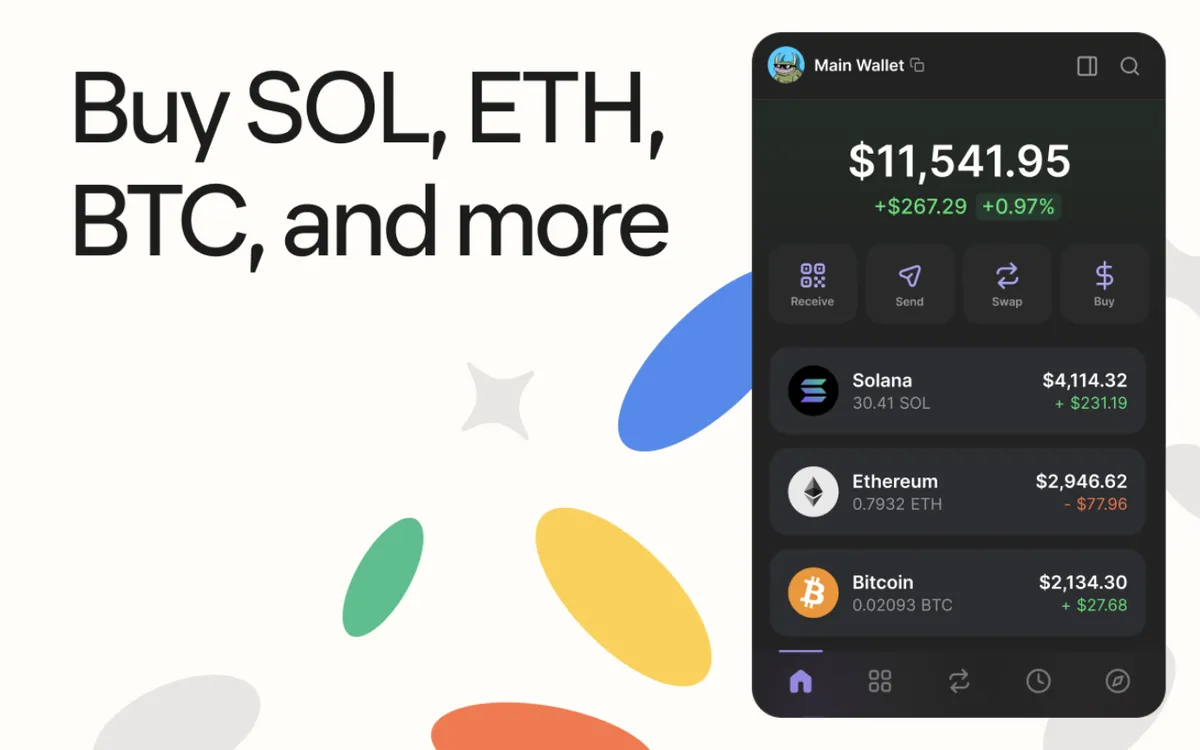
Phantom is a browser extension and mobile app wallet. It launched in 2021 as a wallet for Solana and became the one most Solana apps are built around. It has since added Ethereum, Bitcoin and several other networks.
Who makes it
Phantom Technologies, a US company, publishes the extension. The Microsoft Edge store lists it under that name.
What you can do with it
Hold and send crypto on several networks. Phantom supports Solana, Ethereum, Base, Polygon, Bitcoin, Sui, HyperEVM and Monad from one seed phrase. For Bitcoin it supports the modern address types used for Ordinals, the Bitcoin collectibles. You cannot add networks of your own.
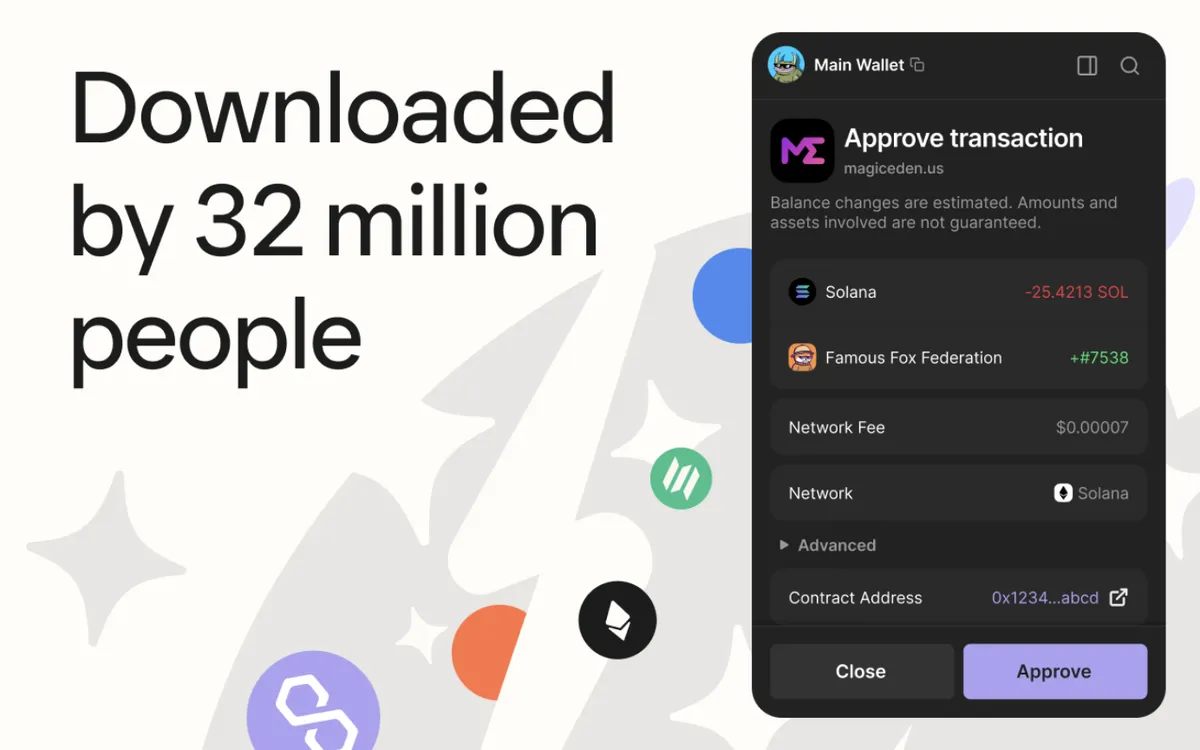
Use Solana apps. When you connect to a Solana exchange, game or marketplace, Phantom is the window that asks you to approve. It shows what a transaction will do to your balances before you sign, as in the screenshot below.
Swap and bridge. Phantom has built-in swaps and bridging. It charges 0.85% on selected swaps, plus network fees and the price impact of the trade. Bridge fees are typically 0.1% to 0.5%.
Stake SOL. You can stake SOL to a validator of your choice from inside the wallet. The validator keeps a commission that Phantom does not set. A liquid staking option gives you a token in return, with a 0.1% fee to exit. Lesson 8 explains staking, and Lesson 48 explains liquid staking tokens.
Collect NFTs. Phantom shows Solana NFTs, Ethereum NFTs and Bitcoin Ordinals.
Spot scams. It flags known malicious websites, hides spam NFTs and warns about suspicious transactions.
Use a Ledger. Phantom supports Ledger hardware wallets in the extension and over Bluetooth on mobile. It does not support Trezor.
What it is less good at
You cannot add custom networks, so if an app runs on a network Phantom does not list, you need another wallet. Hardware support is limited to Ledger. And Phantom has not said its code is open source; it does publish its security audit reports.
Is it safe?
Phantom is self-custody: the seed phrase is made on your device and Phantom cannot recover it. Its transaction previews and scam warnings help, but they cannot catch everything. Solana's fast, cheap transactions make it a busy target for "drainer" sites that try to get you to approve a transfer of everything you hold (Lesson 37).
Fake Phantom extensions exist in browser stores, some with a copied logo and a name written in look-alike characters. Install it only through phantom.com.
Who it suits
People who mainly use Solana, and anyone who wants one wallet for Solana, Ethereum and Bitcoin. Users who want Trezor support or custom networks should look elsewhere.
Setting it up safely
- Install from the source. Go to phantom.com yourself, by typing the address, and follow its link to your browser's extension store. Do not use search ads or links from messages. On the store page, check the publisher name and the number of users.
- Write the seed phrase on paper. Phantom shows it once when you create a wallet. Write every word in order and keep it offline. Lesson 30 shows how, and our free backup card helps.
- Never type the phrase anywhere else. No genuine site, support agent or app update will ask for it.
- Start small. Send a small amount first and check it arrives before moving more.
- Review connections. From time to time, remove app connections and token approvals you no longer use.
How it compares
Compared with MetaMask, Phantom is stronger on Solana and has a slightly lower swap fee (0.85% against 0.875%), but cannot add custom networks and supports only Ledger. Compared with Solflare, another Solana wallet, it covers more networks but offers fewer hardware options. See the MetaMask and Solflare guides.
Phantom is the main wallet for Solana and now covers Ethereum, Bitcoin and other networks too. It previews transactions and stakes SOL, but supports only Ledger, has no custom networks and charges 0.85% on selected swaps.
These guides describe what each wallet does. They are not recommendations, and none of these companies paid to be listed. Never type your seed phrase into a website, and install wallets only through the maker's own site.
Sources
- Coin Bureau: Phantom wallet review (June 2026)
- Firefox Add-ons: Phantom listing
- Microsoft Edge Add-ons: Phantom listing
Checked against these sources on 13 October 2026.
The course by email
Five short emails to get you started, each built on one lesson. After that, one short email a month about what is new. No price tips and no hype.
Free. Unsubscribe any time. See our privacy notice.
Want your progress saved too? Create a free account.