
MetaMask browser wallet: what it does and how it works
MetaMask is the best-known Ethereum browser wallet, now also handling Solana and Bitcoin. A plain guide to its features, fees, networks and risks.
Product details
| Made by | Consensys |
|---|---|
| Launched | 2016 |
| Networks | Ethereum and compatible networks (Arbitrum, Optimism, Base, Polygon, BNB Chain and more), plus Solana and Bitcoin |
| Browsers | Chrome, Firefox, Brave |
| Mobile app | iOS and Android |
| Hardware wallets | Ledger, Trezor |
| Built-in swaps | Yes. 0.875% MetaMask fee plus network fees |
| Open source | Partly. Snaps system is open source |
| Custody | Self-custody. You hold the seed phrase |
What you can do with it
| Feature | Available | Notes |
|---|---|---|
| Send and receive | Yes | Tokens on every supported network |
| Connect to crypto apps | Yes | The default wallet many Ethereum apps expect |
| Swaps | Yes | Quotes from several exchanges; 0.875% fee |
| Bridging between networks | Yes | Quotes from bridge providers and aggregators |
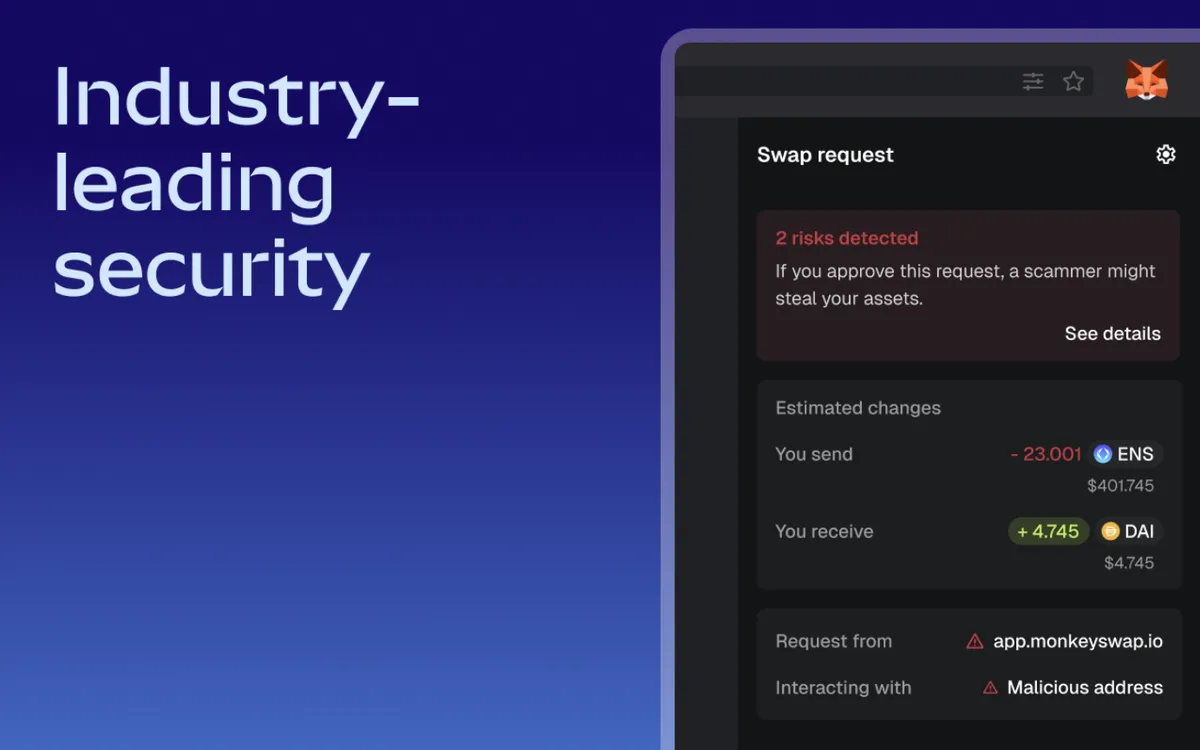
| Scam and risk warnings | Yes | Flags suspicious requests before you sign |
| Add-ons (Snaps) | Yes | Run isolated inside MetaMask |
| Custom networks | Yes | Add any Ethereum-compatible network by hand |
| NFT gallery in the extension | Partly | Focus is on tokens and apps |
Screenshots
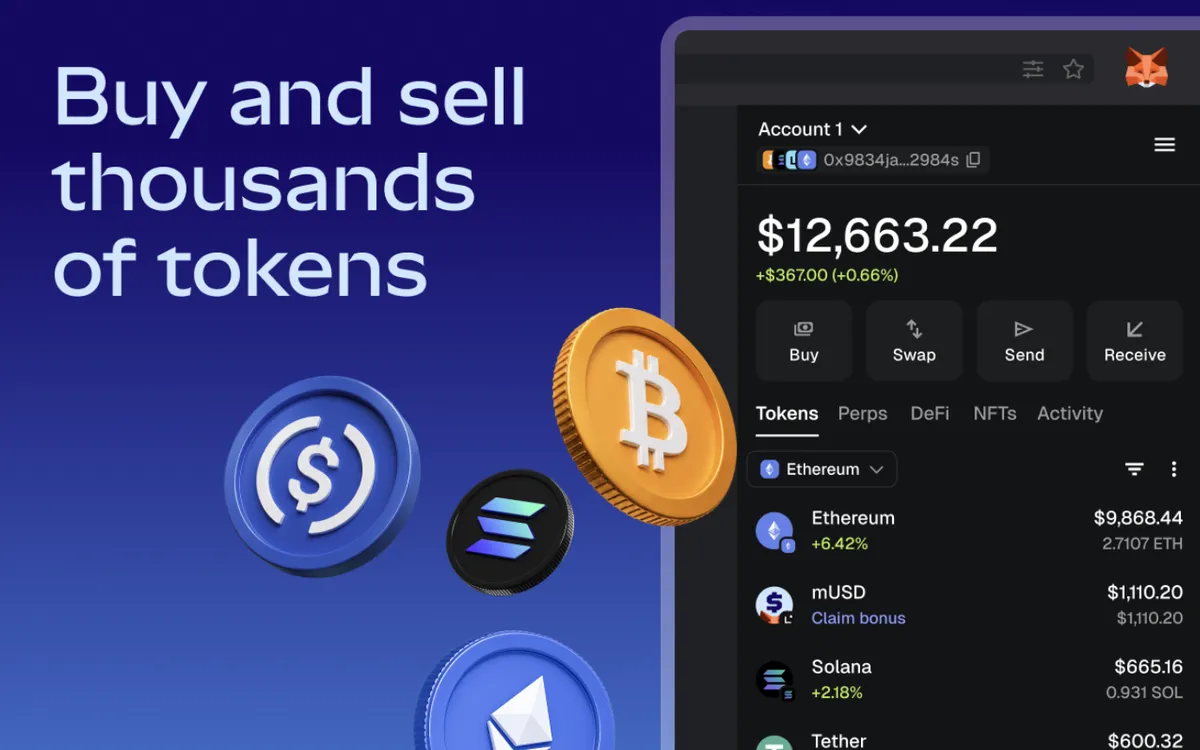
MetaMask is a browser extension and mobile app that holds your keys and connects you to crypto apps. It is the wallet most Ethereum apps were built around, and for many people it was the first wallet they installed.
Who makes it
Consensys, a US software company, launched MetaMask in 2016. It began as an Ethereum-only wallet and has added other networks over time.
What you can do with it
Hold and send crypto. MetaMask shows your tokens across Ethereum and the networks built on top of it, such as Arbitrum, Optimism, Base and Polygon. You can add other Ethereum-compatible networks yourself by entering their connection details. Lesson 33 explains what these networks are.
Use crypto apps. When you visit an exchange, lending app or NFT marketplace, MetaMask is what pops up to ask you to approve a connection, a signature or a transaction. Lesson 7 explains smart contracts, the programs those apps run on.
Swap and bridge. MetaMask collects quotes from several exchanges and bridges and shows you the best one. It does not trade itself. It charges a fee of 0.875% on swaps, on top of the network fee and the price the exchange gives you. Swaps work on more than a dozen networks, including Ethereum, Base, Solana, Bitcoin, BNB Chain and Polygon. Coin Bureau notes that swap aggregators such as 1inch and Matcha charge roughly 0 to 0.3%.
Warn you before you sign. MetaMask checks requests and shows warnings such as "risks detected" when a request looks like a known scam. The screenshot below shows one.
Extend it. Snaps are add-ons, written by outside developers, that run in an isolated space inside MetaMask. They add things such as support for other networks.
Use a hardware wallet. MetaMask works with Ledger and Trezor devices, so the keys stay on the device and MetaMask acts as the screen and the connection. Lesson 28 explains why that is safer.
What it is less good at
The fee on built-in swaps is higher than many alternatives. The extension is focused on tokens and apps; collectors may prefer a wallet with a fuller NFT view. And because it is the most popular wallet, it is the most copied by scammers: fake MetaMask extensions, apps and "support" accounts are common.
Is it safe?
MetaMask is a self-custody wallet: your seed phrase is created on your device, and MetaMask cannot see or recover it. That makes you responsible for the backup (Lesson 30).
The biggest risks are the same as for every browser wallet. Malware on your computer, a fake extension or a phishing site can take your seed phrase or trick you into signing something harmful. Lesson 37 shows how malicious approvals work. Keep large amounts on a hardware wallet connected to MetaMask, not in the extension alone.
Who it suits
Anyone who uses Ethereum apps regularly, and beginners who want the wallet most guides and apps assume you have. Solana-first users may prefer a wallet built around Solana.
Setting it up safely
- Install from the source. Go to metamask.io yourself, by typing the address, and follow its link to your browser's extension store. Do not use search ads or links from messages. On the store page, check the publisher name and the number of users.
- Write the seed phrase on paper. MetaMask shows it once when you create a wallet. Write every word in order and keep it offline. Lesson 30 shows how, and our free backup card helps.
- Never type the phrase anywhere else. No genuine site, support agent or app update will ask for it.
- Start small. Send a small amount first and check it arrives before moving more.
- Review connections. From time to time, remove app connections and token approvals you no longer use.
How it compares
Compared with Rabby, MetaMask covers more networks, including Solana and Bitcoin, but its swap fee is higher (0.875% against 0.25%). Compared with Phantom, it lets you add your own networks and supports Trezor as well as Ledger. Our Rabby and Phantom guides set out the differences.
MetaMask is the browser wallet most Ethereum apps expect, now with Solana and Bitcoin too. It works with Ledger and Trezor and warns about risky requests, but its built-in swaps cost 0.875% and its popularity makes it the most copied by scammers.
These guides describe what each wallet does. They are not recommendations, and none of these companies paid to be listed. Never type your seed phrase into a website, and install wallets only through the maker's own site.
Sources
Checked against these sources on 13 October 2026.
The course by email
Five short emails to get you started, each built on one lesson. After that, one short email a month about what is new. No price tips and no hype.
Free. Unsubscribe any time. See our privacy notice.
Want your progress saved too? Create a free account.